 Sync, clip, and present from one Mac
Advanced Trial Presentation Software, No tech degree required
Evidentiary runs your evidence from one Mac: deposition video synced to the word, clips cut to the page and line, impeachment cued and cited, exhibits on the jury display. Stage privately. Publish deliberately. Blackout instantly.
Designed for trial. Optimized for Mac.
Every feature in the current build, one subscription, no add-ons.
201Screens, two audiences: your private workspace and the jury display.
2Keystroke darkens every courtroom screen and brings the exhibit back.
1Runs on your Mac. No cloud, no accounts, no telemetry.
100%One case, start to finish: sync it, cut it to the word, publish it to the jury
Learn the workflow. Watch it done, then do it
Work with confidence. Every feature at your fingertips
Your Mac carries the whole case: the exhibit sidebar, the annotation tools, your presenter notes, the mode control. The jury display carries one thing at a time, and only once you say so.
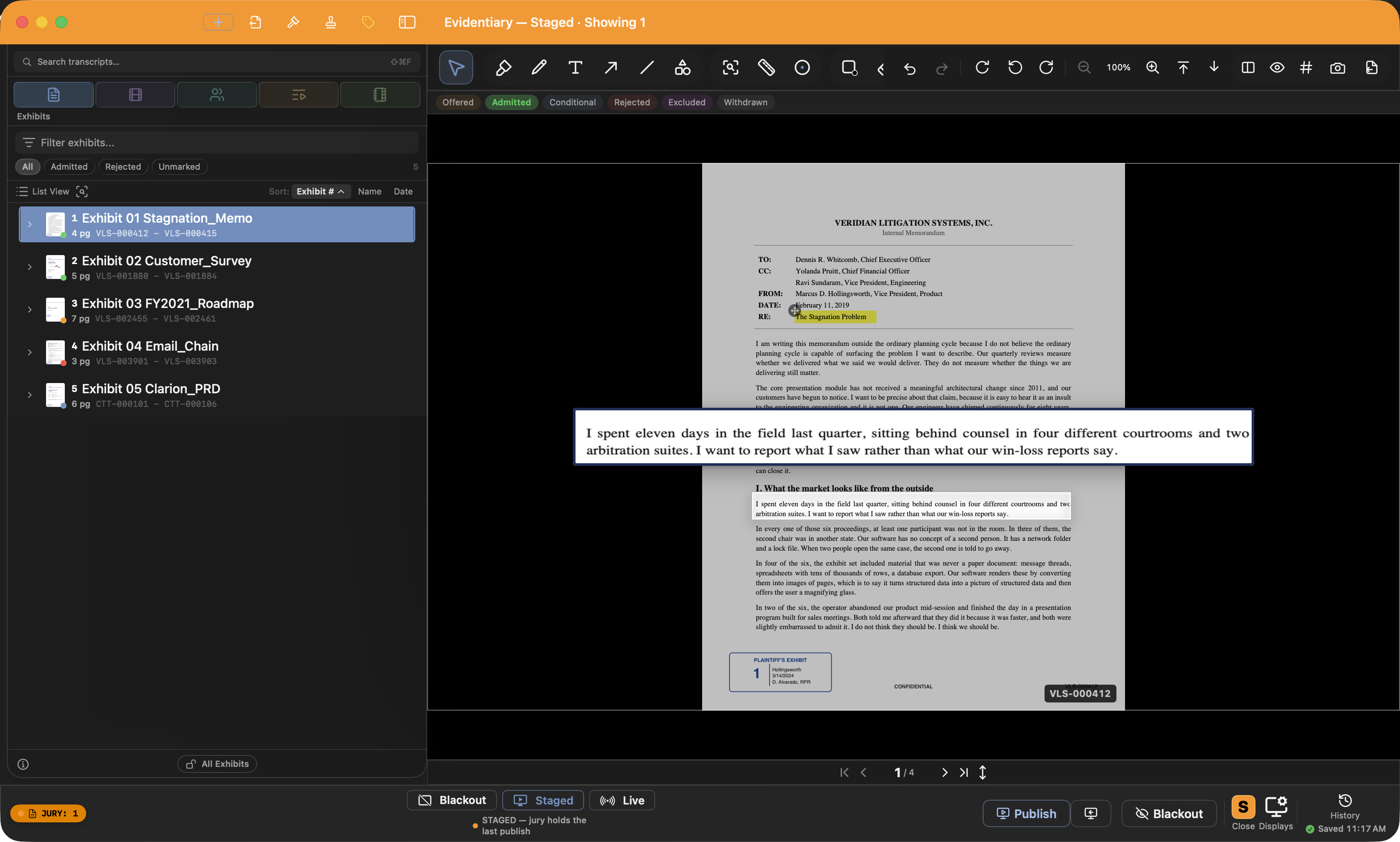
Your Mac · never goes dark
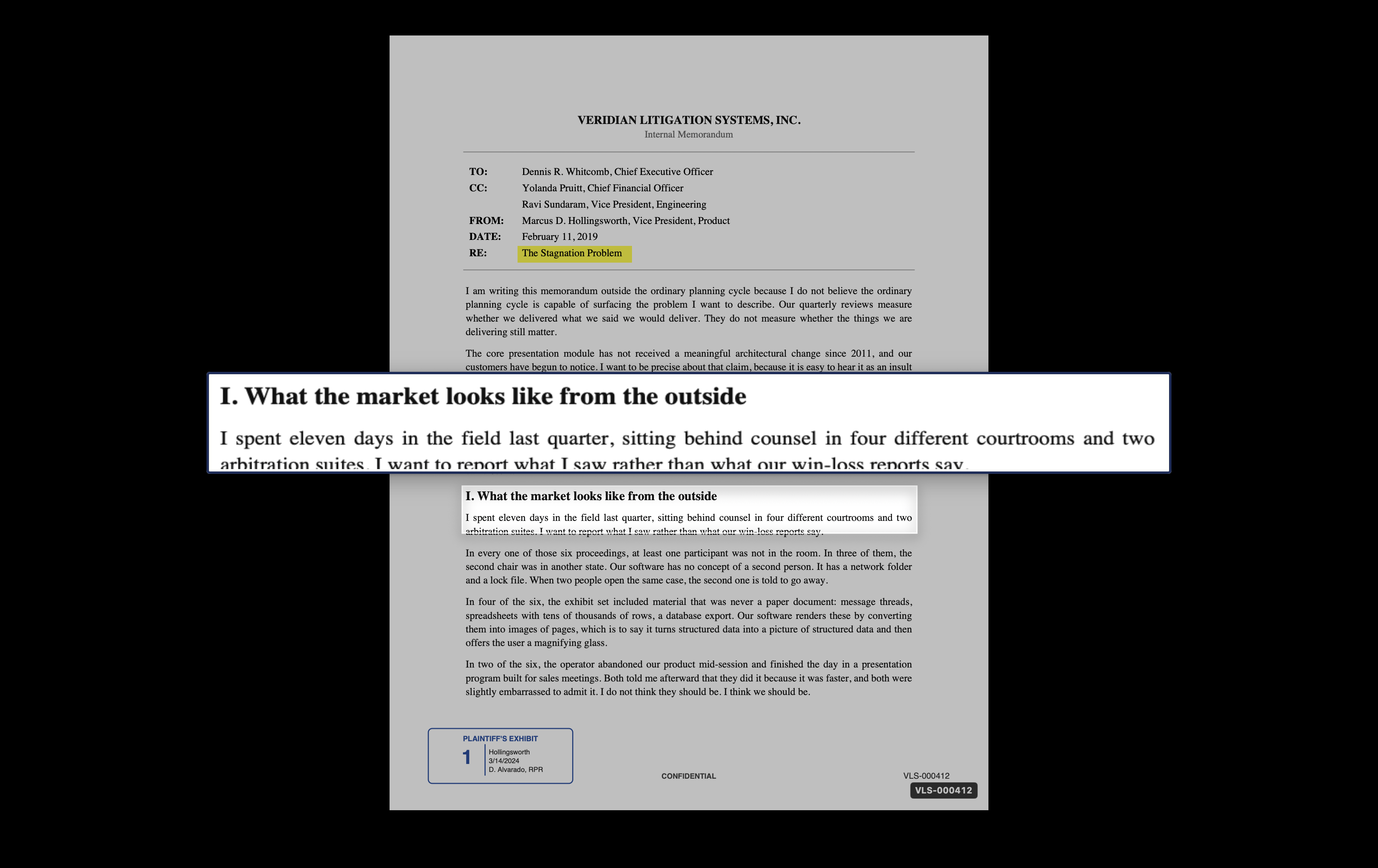
What the courtroom sees
Two screens, two audiences. You publish Exhibit A and the jury display shows it; your workspace stays your own. Objection? One key darkens the courtroom, never your Mac. Try it: press B.
Three keys run the room. You already know them.
Publish
Stage anything on your screen first. Press Return when it's ready for the jury. The published copy freezes, so you can keep working ahead in private.
Blackout
Objection? Bench conference? One key darkens every courtroom screen. One key brings the exhibit back, exactly where it was.
Staged ↔ Live
Publish-on-demand by default. Flip to Live and every page turn mirrors to the jury as it happens. Flip back, and the jury locks on what it was seeing.
Sync a deposition to word level accuracy All Local, All Offline
Drop in the video and the transcript. On-device speech recognition timestamps every line, most down to the individual word, and it runs fast enough to sync a deposition the night before you use it. No upload, no sync vendor, no connection required. Every clip you cut afterward lands exactly on the word.
Auto-Sync (Speech): every line timestamped, most words exact
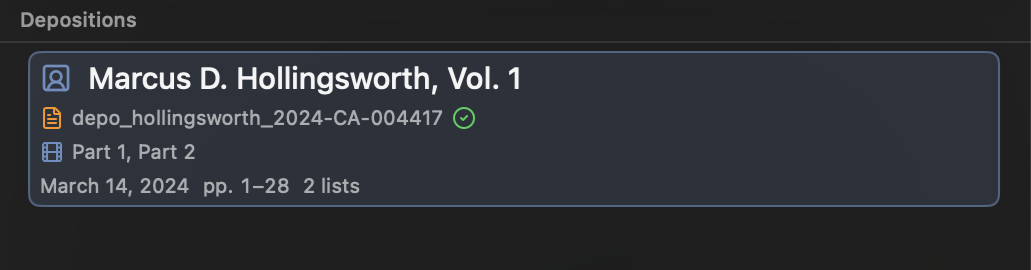
Every transcript wears its sync status and its page range
- Edit Sync, by ear. When a stretch drifts, play from any line and tap Return as each line is spoken: the line pins to the playhead, the next one arms, and the tape keeps rolling. Verified lines never move; only the drift between your pins re-times.
- Speech recognition finishes the job. Apply, and the app listens again to the stretches you repaired and polishes them to the word. A weak match never overwrites your timing.
- Every volume accounted for. Each transcript shows its page range under the deponent's name, so a missing volume or day of a multi-volume witness is obvious at a glance.
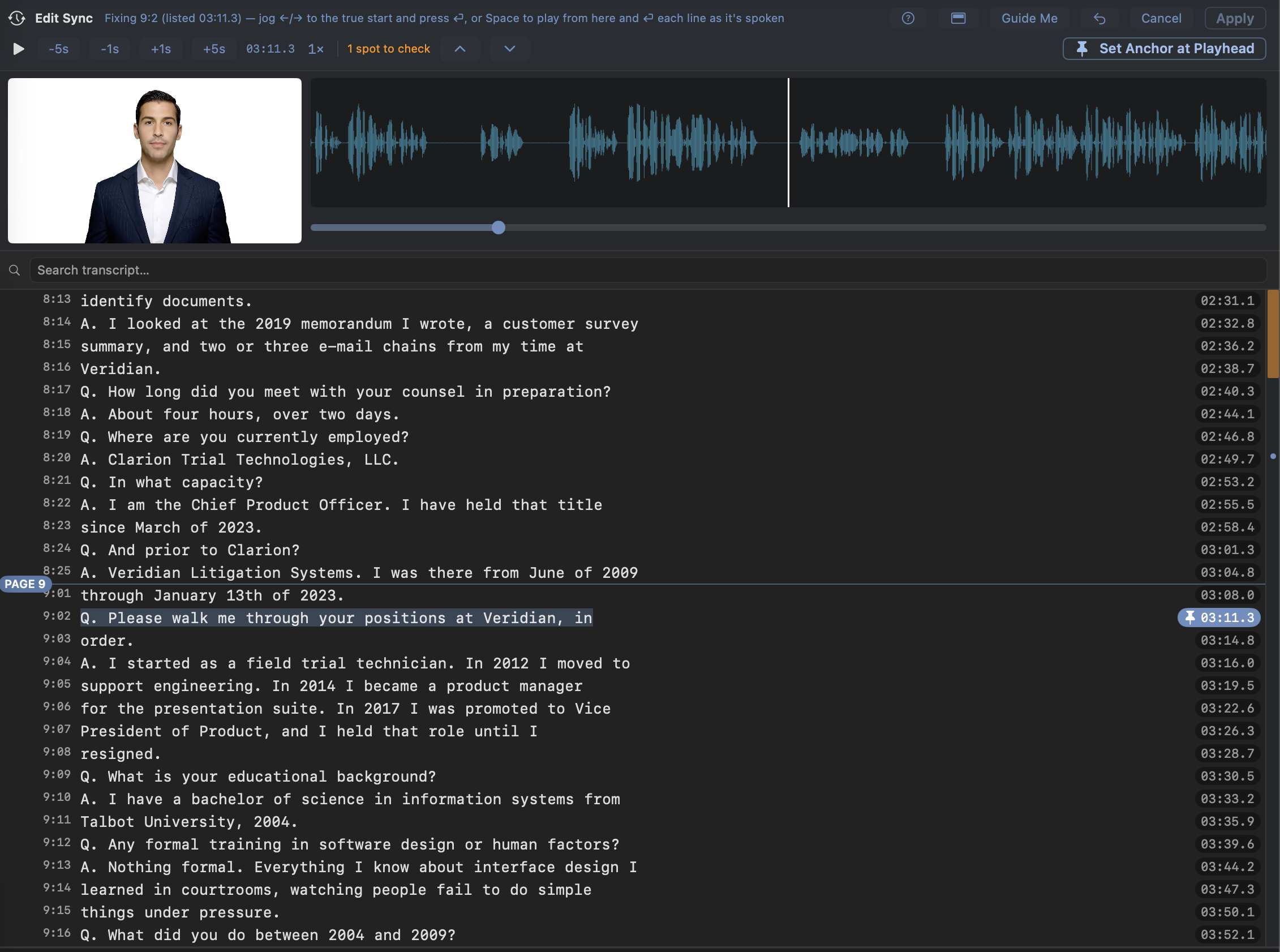
Edit Sync: play, tap Return on each line, apply
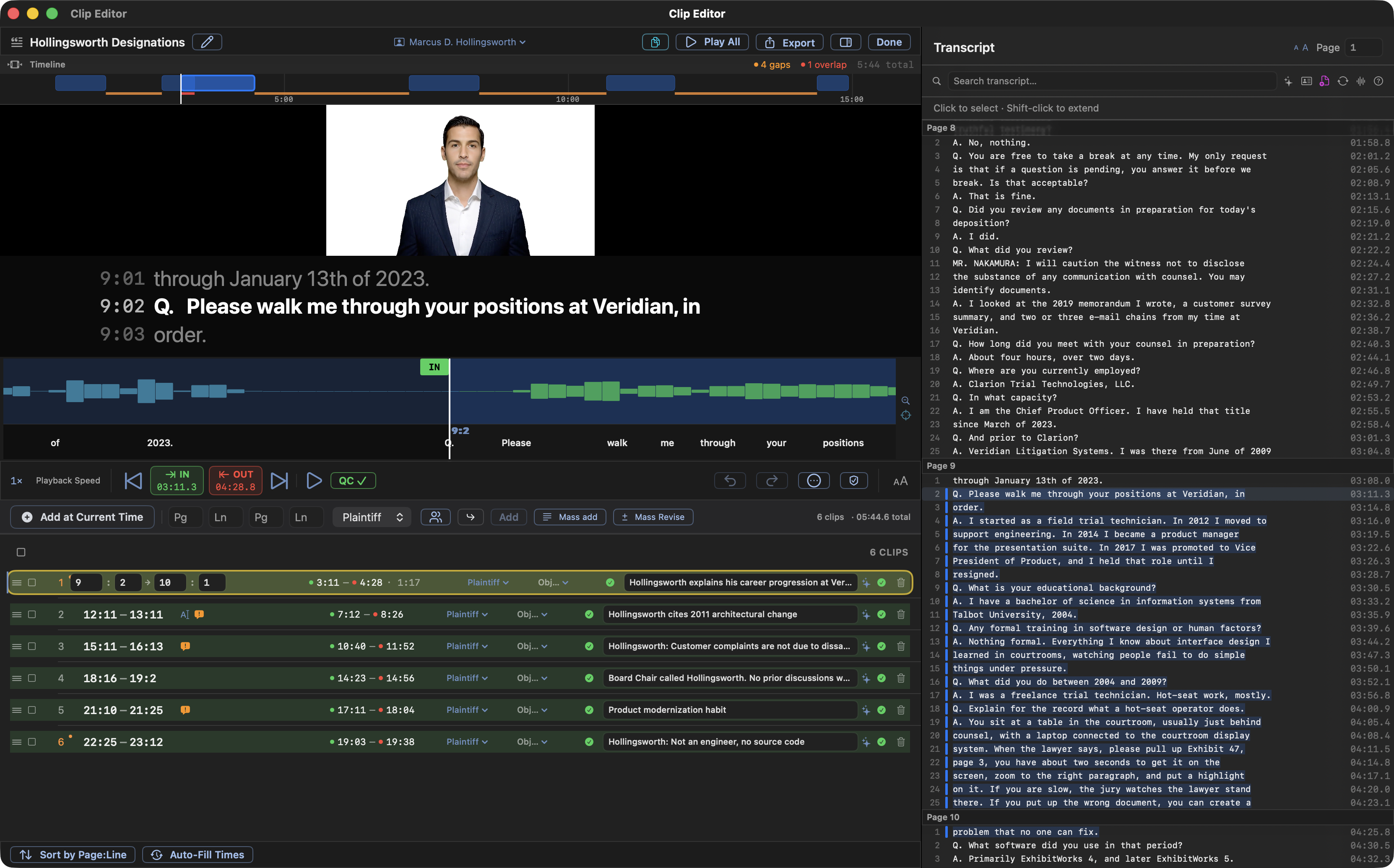
Advanced Clip Creation means More time to focus on your case, less time doing tedious tasks
- Mass Add. Paste opposing counsel's whole designation list, compact ranges, the formal wording, or a table copied out of a PDF or Word file, or drop their file anywhere in the window, and watch every line validate live. One paste can cover several witnesses, and a range that belongs to another volume routes itself there. Or drop a highlighted PDF and map each color to a party.
- QC Review. Audition every in and out point in seconds each. Verified clips wear a green check that clears itself if the clip is ever touched again. A stale checkmark is impossible.
- Auto QC. A pass that listens to every cut and nudges the in and out points onto the nearest word boundary. It trims to the word, not the second, and ends with a tally: how many it resolved, how many still need a look.
- Revisions in one pass. Amended designations arrive; paste them into Mass Revise. Removals run first, deleting, trimming, or splitting clips, then additions extend or create clips, every change previewed clip by clip before anything is touched.
- Counter-designations. Import their file, see overlaps flagged against your list, decide row by row what comes in.
- Objections, inline. Possible Form and Hearsay problems flagged right on the clip, before the judge finds them for you.
- Exports that fit the courtroom. MP4s with burned-in captions, encoded frame by frame so the files stay a fraction of the usual size, condensed-transcript PDFs, and Sync XML, with one-pick presets for courtroom playback, review, and email.
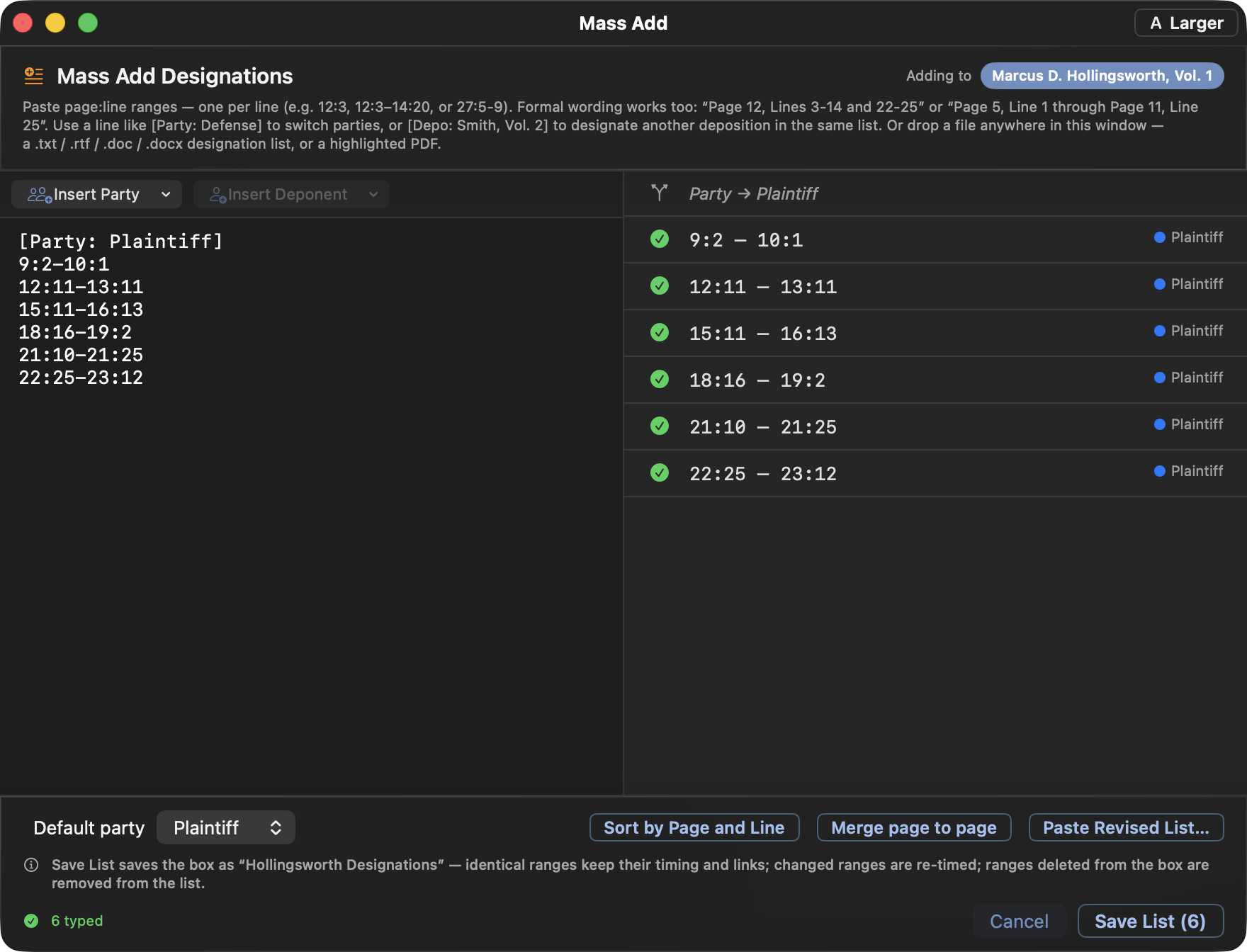
Mass Add: paste or drop the list, watch every range validate live
Run the designations like a broadcast.
Playback Mode runs the whole clip list the way the jury will see it, from an attorney-side window built to drive it: the queue on the left, the running testimony front and center, and a row of switches deciding exactly what reaches the courtroom.
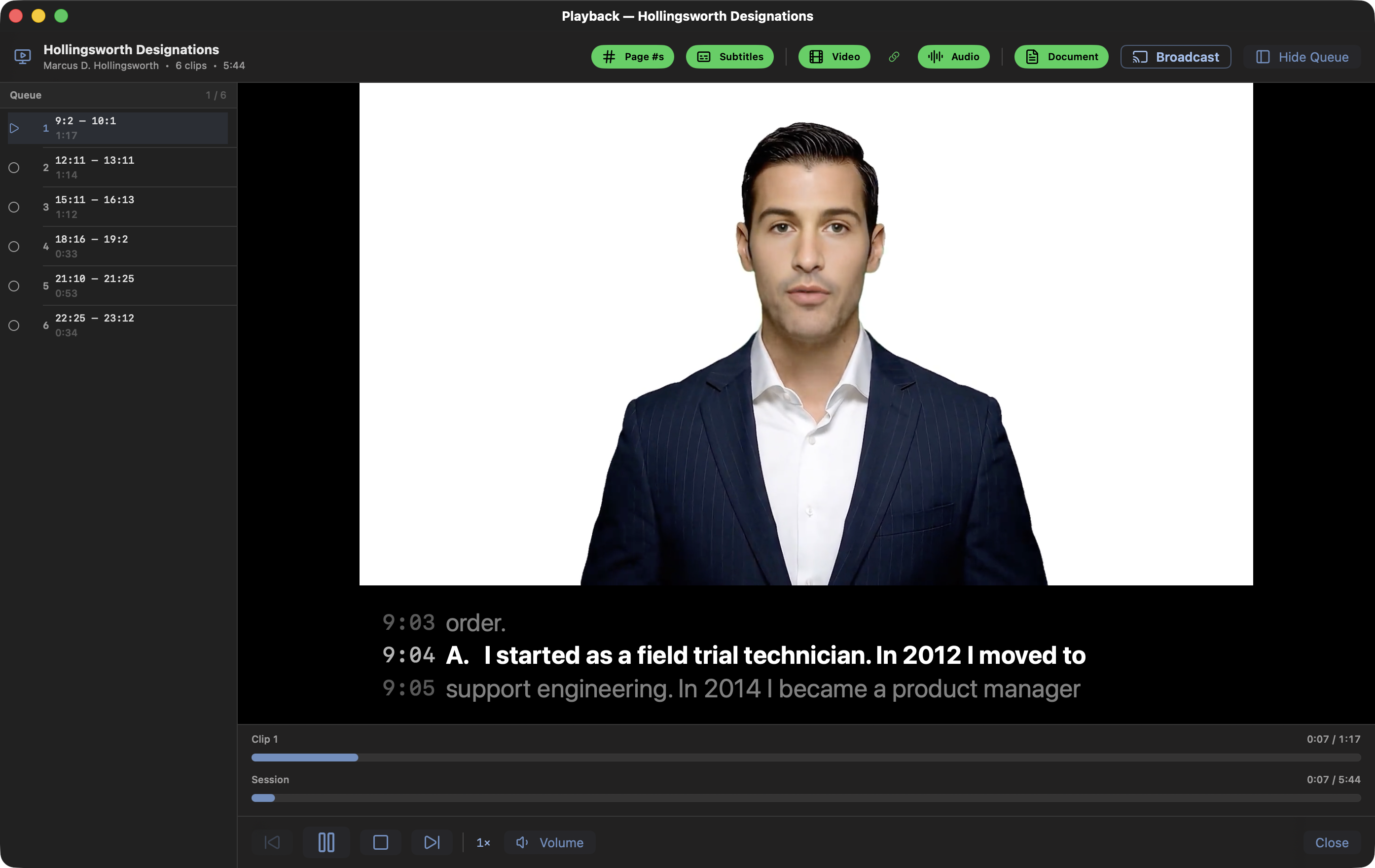
- Broadcast when you're ready. One button sends the running playback to the jury display, opening the jury window if it isn't up yet. Stop, and the jury goes straight back to whatever it was showing. Blackout kills the broadcast outright, like it kills everything else.
- Five switches for the courtroom. Captions, page:line stamps, video, audio, and the linked document: each can be on or off for the jury while your own window keeps showing everything. Chain video and audio together and one click covers an objection.
- Nothing undesignated. Ever. The caption band is clipped to the designation: no line from before the first word or after the last can surface on the jury screen.
- Documents on cue. A clip with a linked exhibit puts the document full-screen and tucks the video into the corner you picked for it.
- Mute, and the captions follow. Mute the audio for an objection and the jury's caption band goes dark with it. Your preview keeps a word cursor so the un-mute lands on the exact word, and nothing spoken while muted ever surfaces on the jury's captions afterward.
- How much longer? The playback bar shows time remaining in the current clip and in the whole list, the question counsel asks mid-playback.
- It knows where you stopped. Close mid-clip tonight; tomorrow's review resumes at the same second.
- Only what should play, plays. Excluded clips, clips without times, and clips whose objection you sustained are left out of the queue entirely.
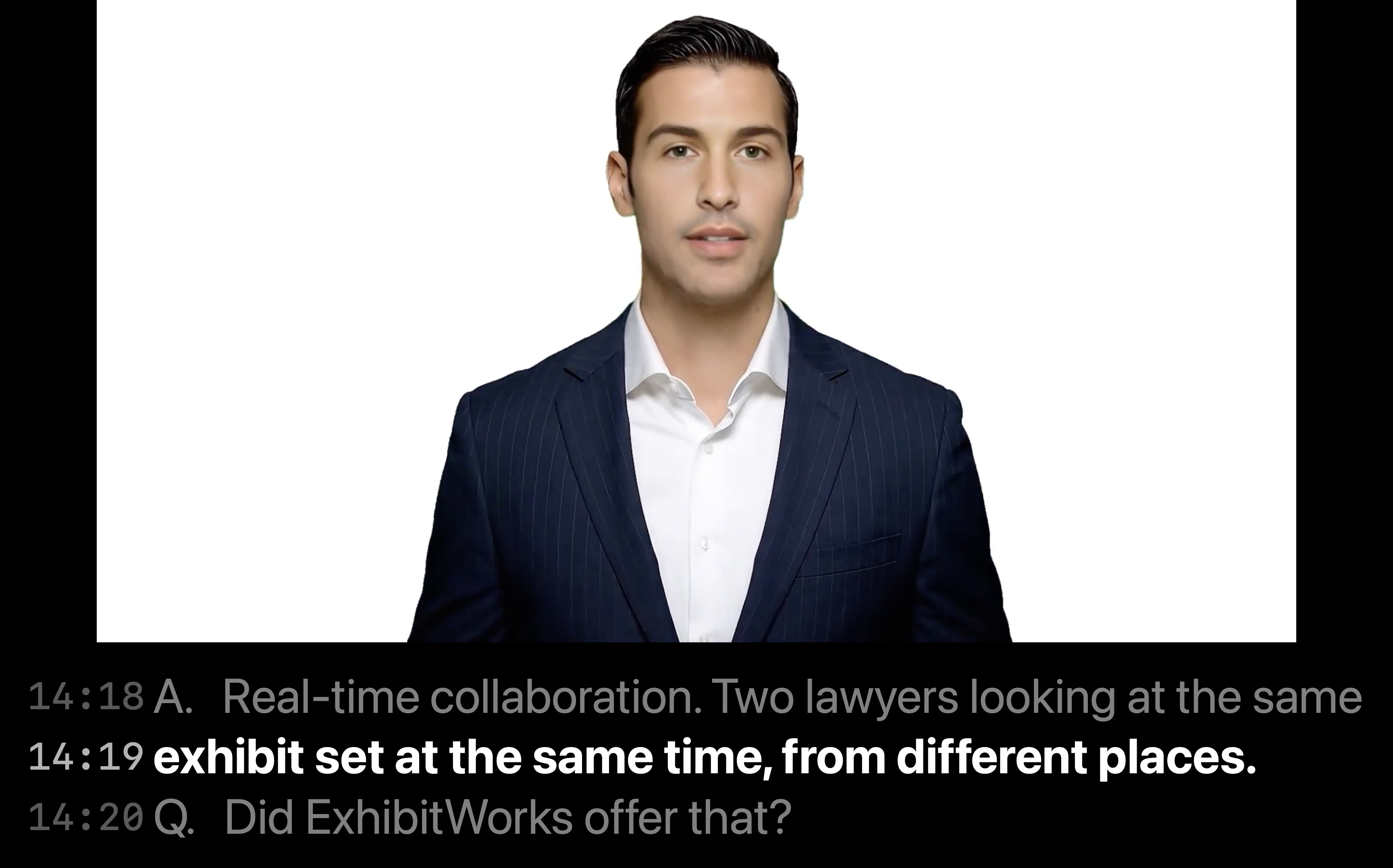
Impeachment, cued and cited.
- Select. Impeach. Done. Select the testimony, run Impeach: a dedicated player opens with the clip cued and live page:line captions, independent of whatever the jury display is doing until you choose to show it.
- No video? No problem. Impeach with Text Only puts the words themselves on the jury display: a clean card with the quote and a full cite. Works on any transcript, no sync required.
- Brief-ready cites. Right-click any testimony to copy it with its citation, ready to paste: (Smith Dep. 12:5–13:2).
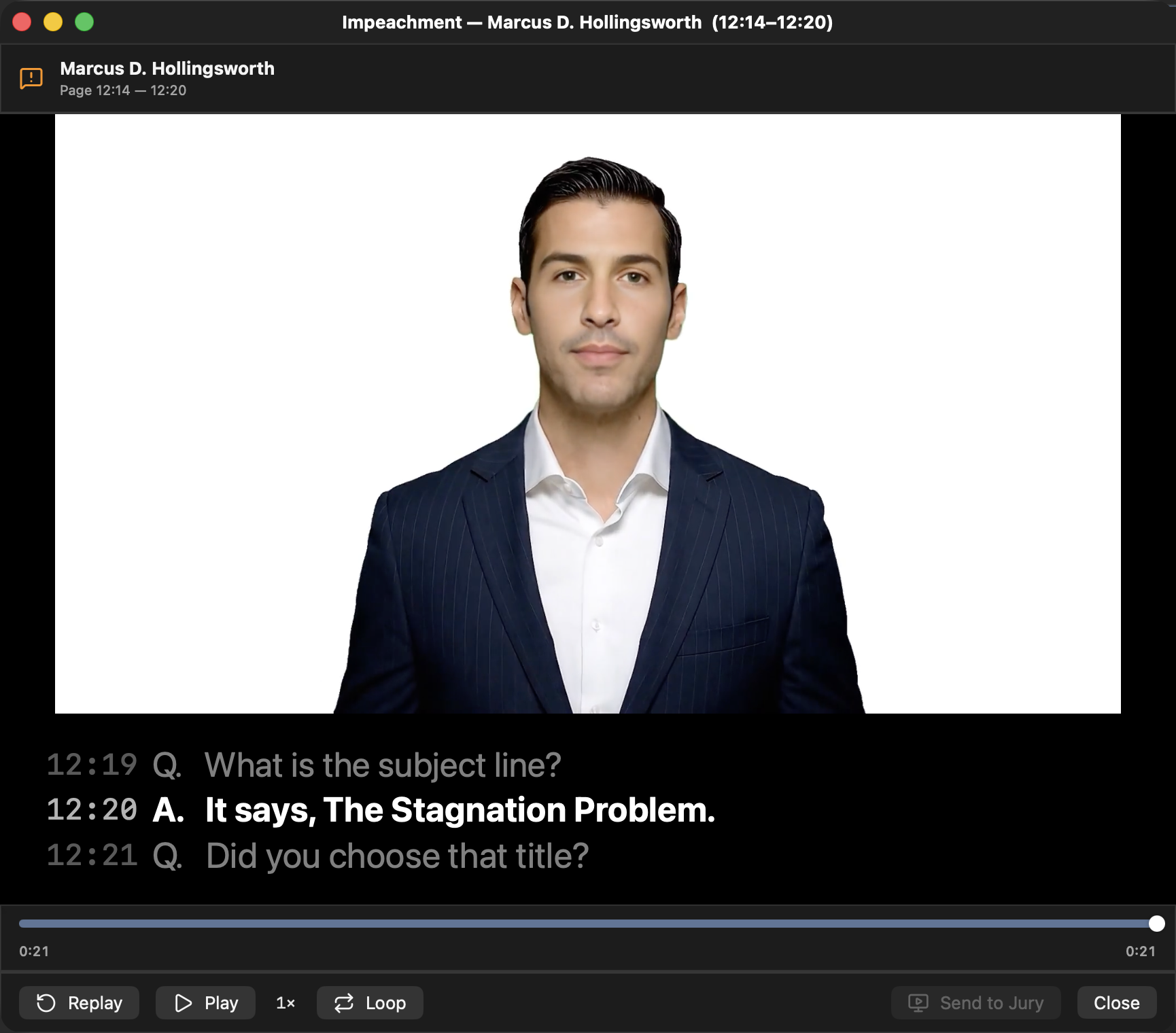
The impeachment player: cued, cited, and private until you send it
“I never saw the maintenance log. Nobody showed it to me.”
SMITH DEP. 12:5–12:8 · VOL. 1 · SHOWN TO THE JURY
Impeach with Text Only: the jury sees the words
Present like the room is yours.
- Annotate live. Highlight, callout magnification, redaction, arrows, measurement, and a laser pointer (classic dot or comet trail) that draws a fading line while you hold the button, every mark reaching the jury as you draw it. Every tool also works when you draw on the jury display itself.
- Presenter notes and jury preview. Your talking points sit under the staged exhibit and a small mirror of the jury display sits beside it, both private to your screen.
- Evidence Lock. Flip one switch and nothing unadmitted can reach the jury by a mis-click. Court-excluded exhibits get a sterner double-check even with the lock off, because that one can mean a mistrial.
- Displays that heal themselves. Projector drops mid-trial? The jury view re-opens and restores the published exhibit the instant the picture returns.
- Trial Mode. Dock hidden, menu bar gone, ⌘Q asks first. Nobody ends your presentation by accident.
Admission status, one click away
The presenter bar: Blackout · Staged · Live
Two documents. One screen. No fumbling.
One key splits the stage in two. The comparison is locked to your jury display's own proportions and divided exactly down the middle: no draggable divider, no surprises. What you lay out at counsel table is pixel-for-pixel what the courtroom sees.
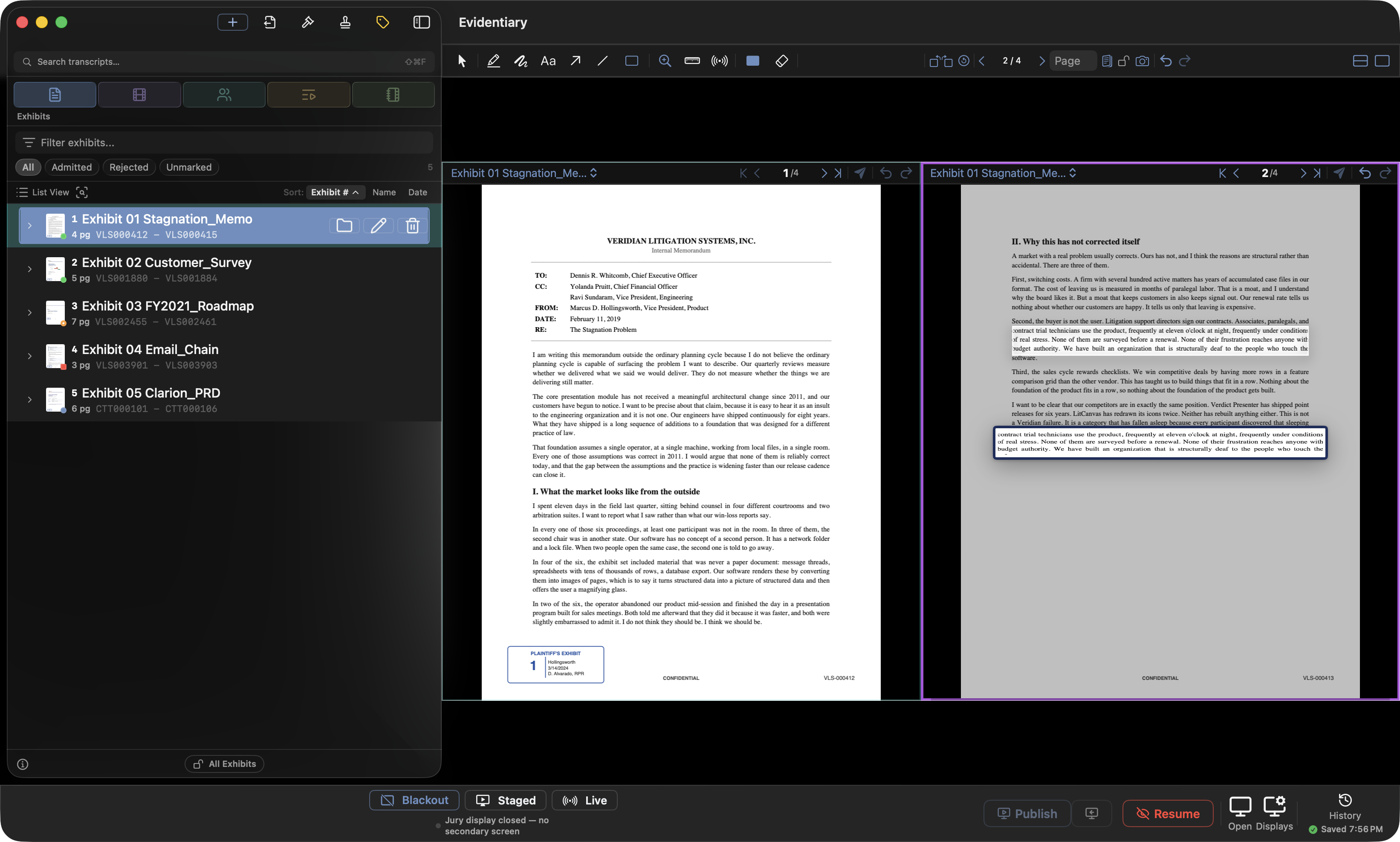
- One key. Backslash splits the staged exhibit into this page and the next. ⇧N re-spreads whenever the panes drift apart, and Tab moves focus between them.
- Fill either pane, three ways. Click a pane and pick from the sidebar, drag a row straight onto it, or use the pane's own dropdown.
- One toolbar, both pages. Choose Highlight once and draw on either side. A callout dragged across the divider paints over its neighbour instead of clipping at the seam.
- Teal and purple. Each pane keeps its identity color, and the same tint marks that exhibit's row in the sidebar. You always know which document is where.
- Lock the comparison. Freeze both pages so a stray click can't swap one out mid-argument.
- Save it whole. One snapshot captures both exhibits, both pages, and every mark, then restores the entire comparison in a click.
Both hands stay on the keyboard
The stage is a scale model of the jury screen
Up to four exhibits at once. Any one of them, full screen, on a key.
Multi-View lays two to four exhibits out side by side or in a 2 × 2 board, on your screen and the jury's. Bring one section up to fill the screen, mark it, and send it back to its place without losing the others.
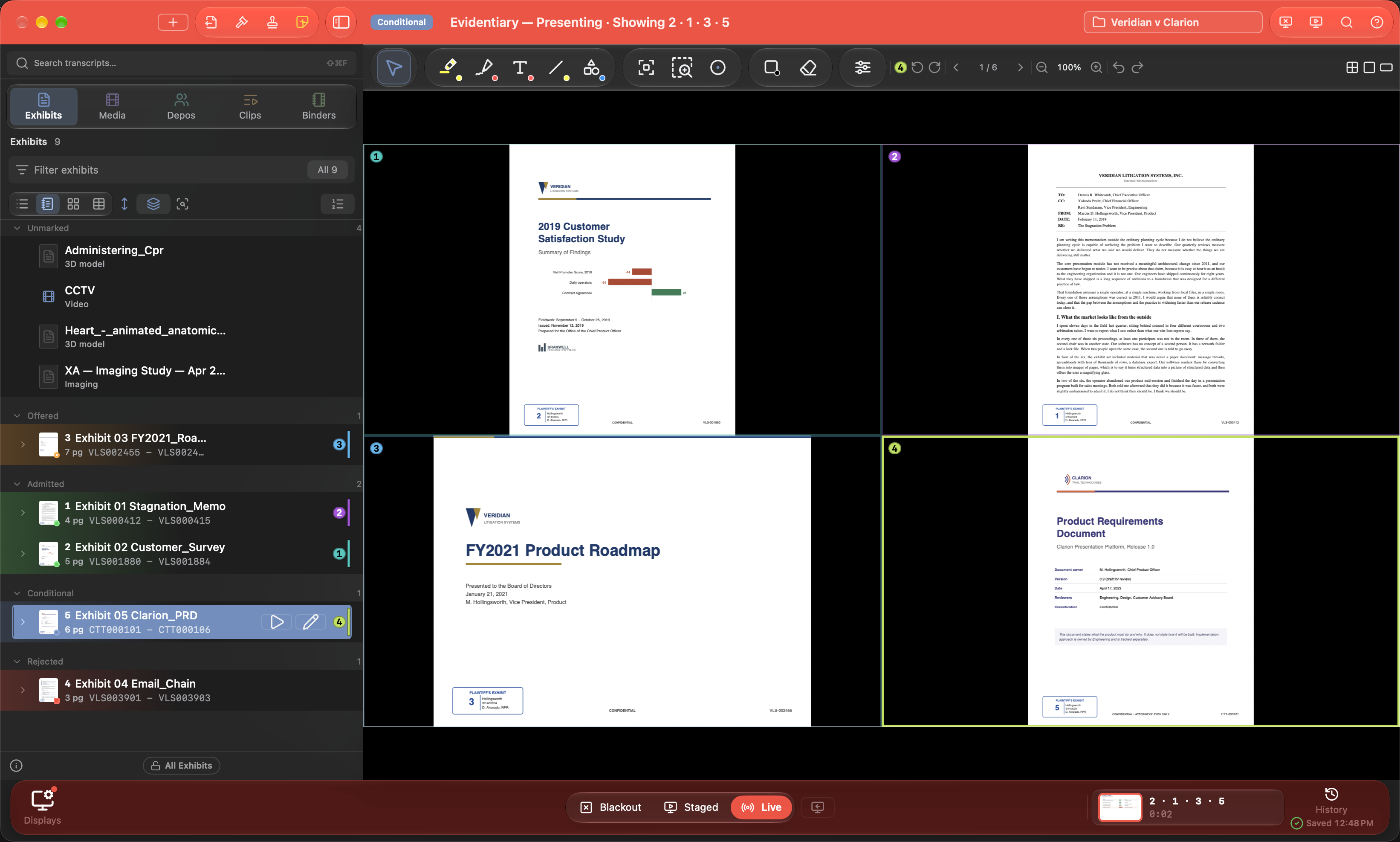
- Four layouts. 2 Across, 3 Across, 4 Across, or 2 × 2, switched from the toolbar without emptying a section.
- Fill a section two ways. Click a section, then click an exhibit or a page in the list. Or drag a row straight onto it.
- Bring Up, then back. U or a double-click brings the selected section up to fill the screen; Escape sends it back to the board.
- The same guards as everywhere. In Live, an exhibit the court excluded is refused, and sections filled while Staged are checked the moment you go Live.
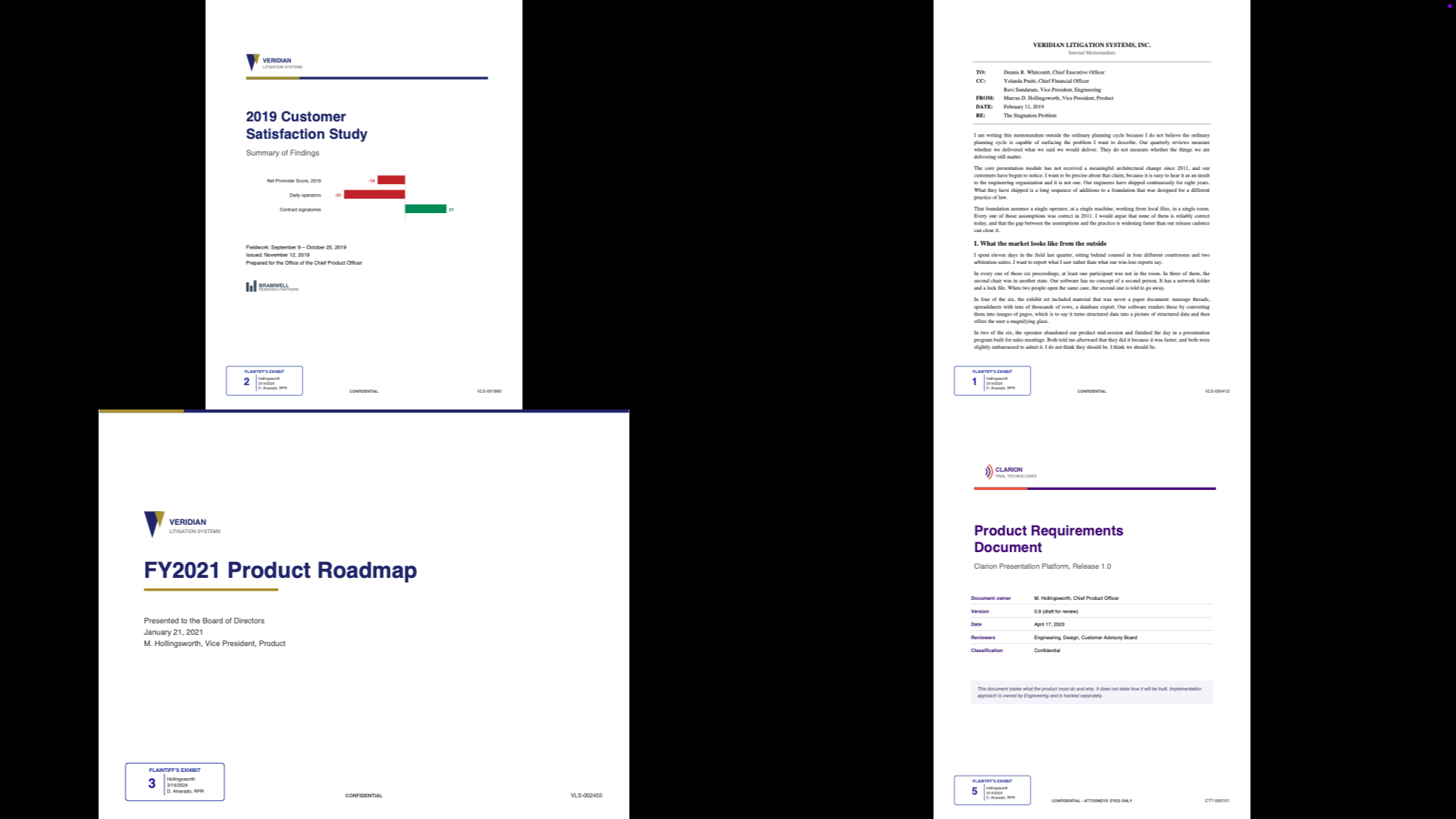
The same board, on the jury display
Evidence that isn't paper. Shown like it is.
Surveillance video, a radiology disc, and a 3D model of the scene or the injury go in the case like any other exhibit, and reach the jury under the same Staged and Live rules.
- Blur Faces. Evidentiary finds the people in a video, including heads seen from behind or from a ceiling camera, and follows each one as they move. Tick who to hide; the blur is burned into the picture on both screens and in any export.
- Mark up video. Highlight, draw, redact, and zoom over a playing or paused video with the same tools you use on a page, and correct a dark or color-cast recording live.
- Medical imaging, from the disc. Import a whole CT, MR, or X-ray disc, browse it by series, set the window, and play it through, with every image checked against its original. For demonstration at trial, not for diagnosis.
- 3D models. USDZ, OBJ, STL, and more open in a viewer you turn with a drag. The jury's view follows yours, and Snapshot makes the angle you chose into a page.
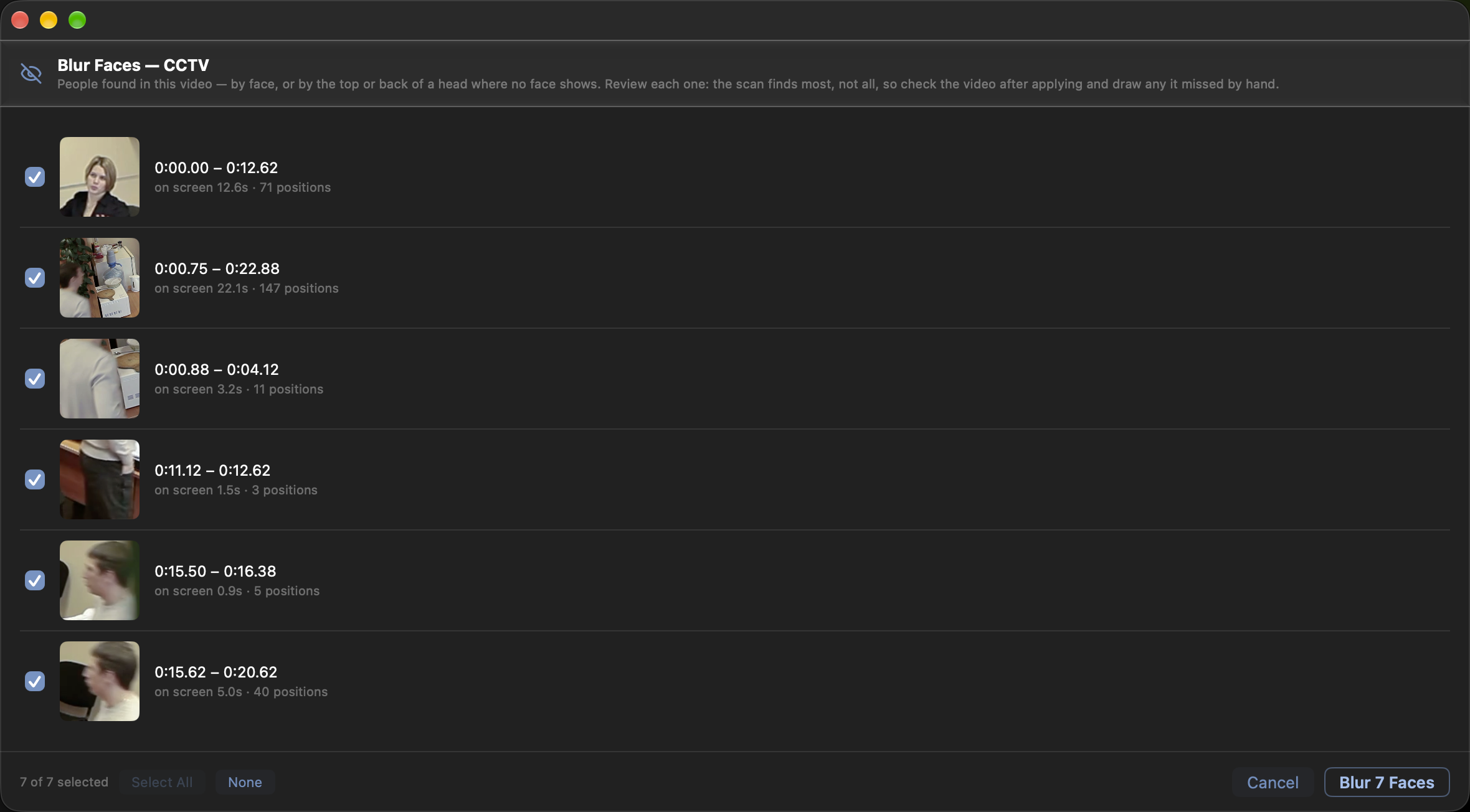
Blur Faces: review each person, then blur
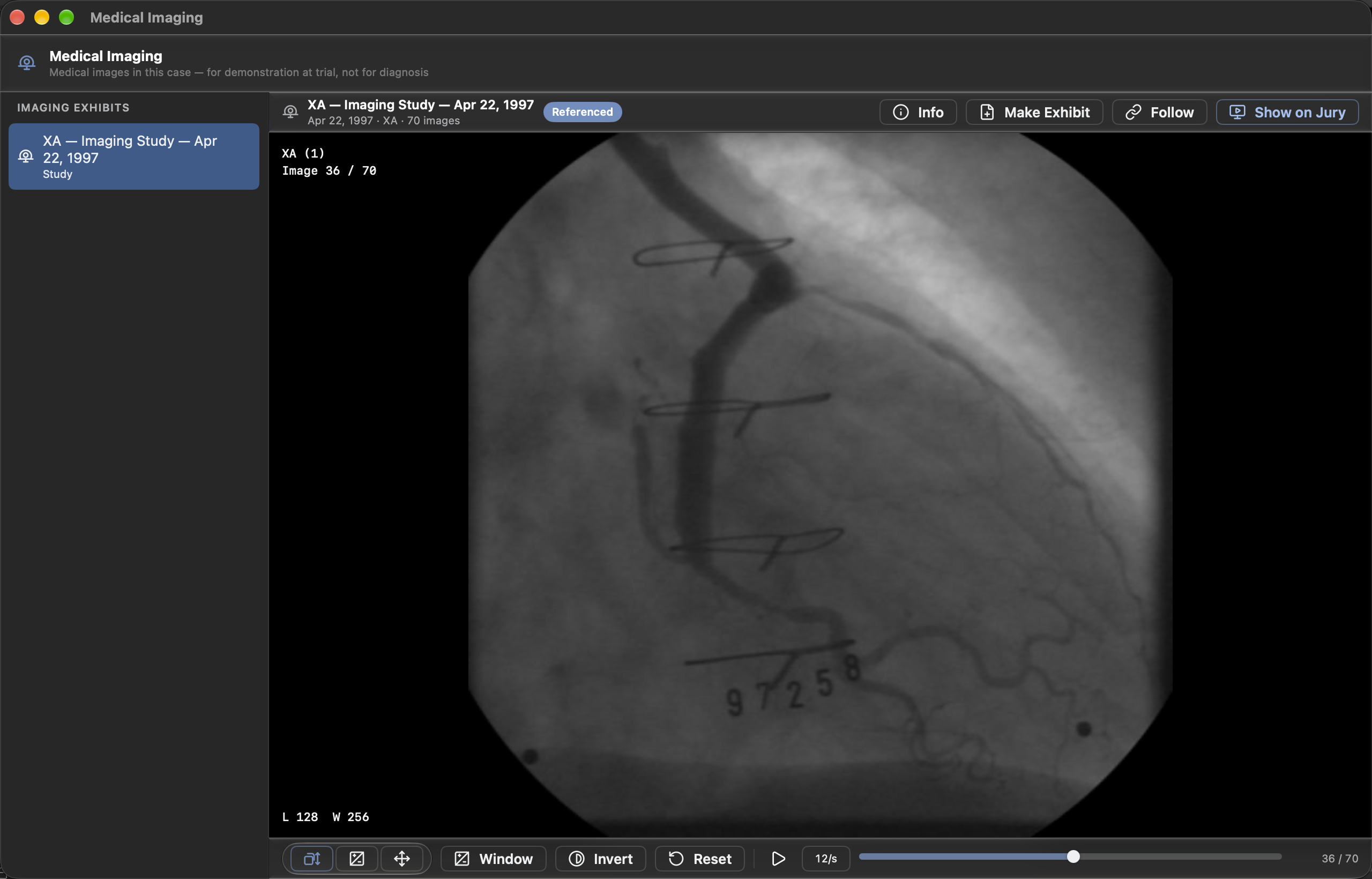
Medical Imaging: series, window, cine
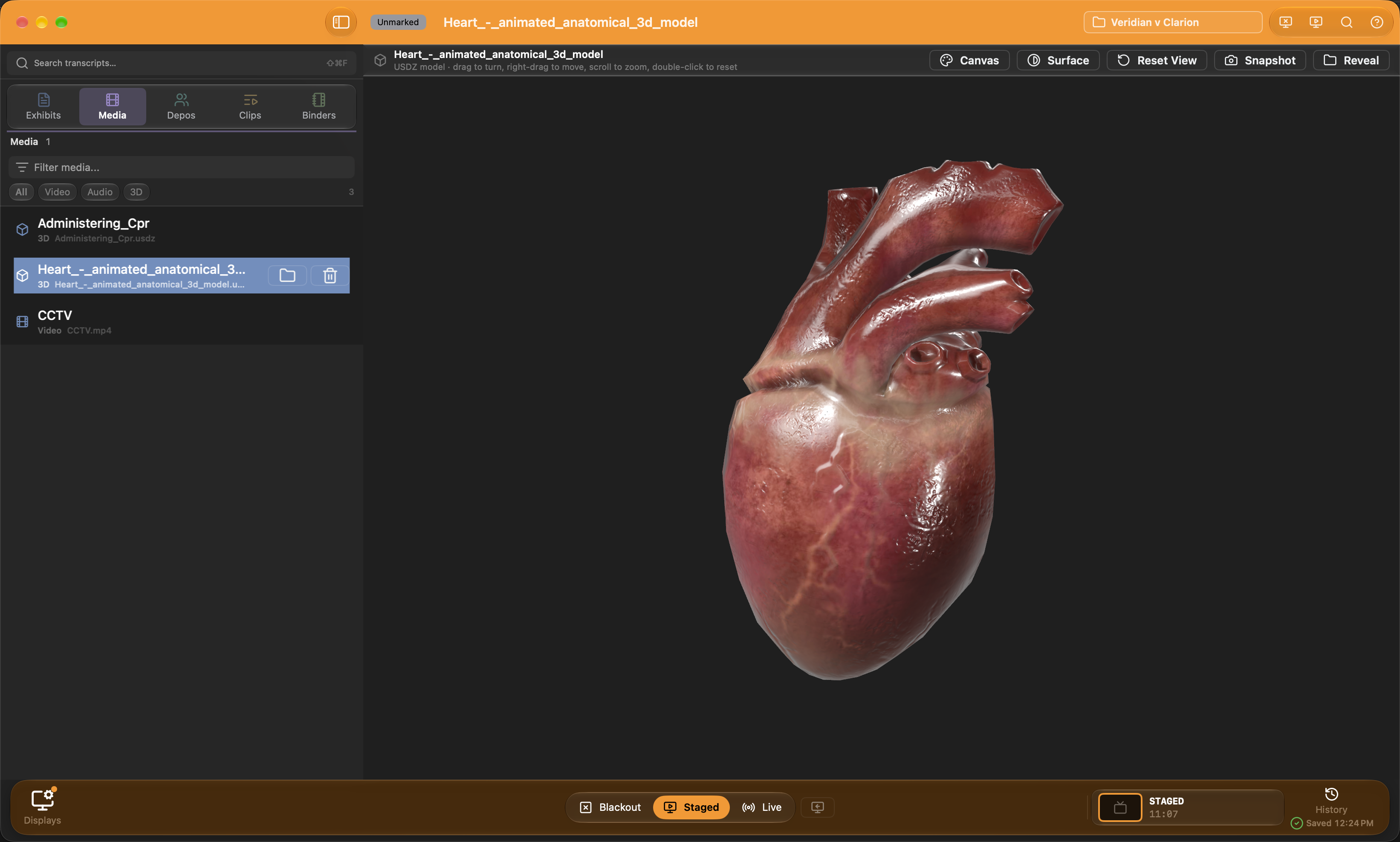
A 3D model, turned to the angle you need
Ask for it the way you'd say it.
- Space, space. One box searches the whole case: exhibits, document text, transcripts, snapshots, and app actions, so "blackout" is a command, not a scroll through menus. Every result wears a badge saying what matched, and Tab narrows the list to one kind.
- Instant, case-wide. Every PDF's text is indexed the moment it lands, typed documents need no OCR step, and results come back in milliseconds no matter how big the case gets.
- Search by meaning. "The email about delaying the shipment" finds the page even when those words never appear. On-device semantic search over your OCR'd exhibits.
- Jump by cite. Type 45:12 and every deposition offers the jump straight to that page and line.
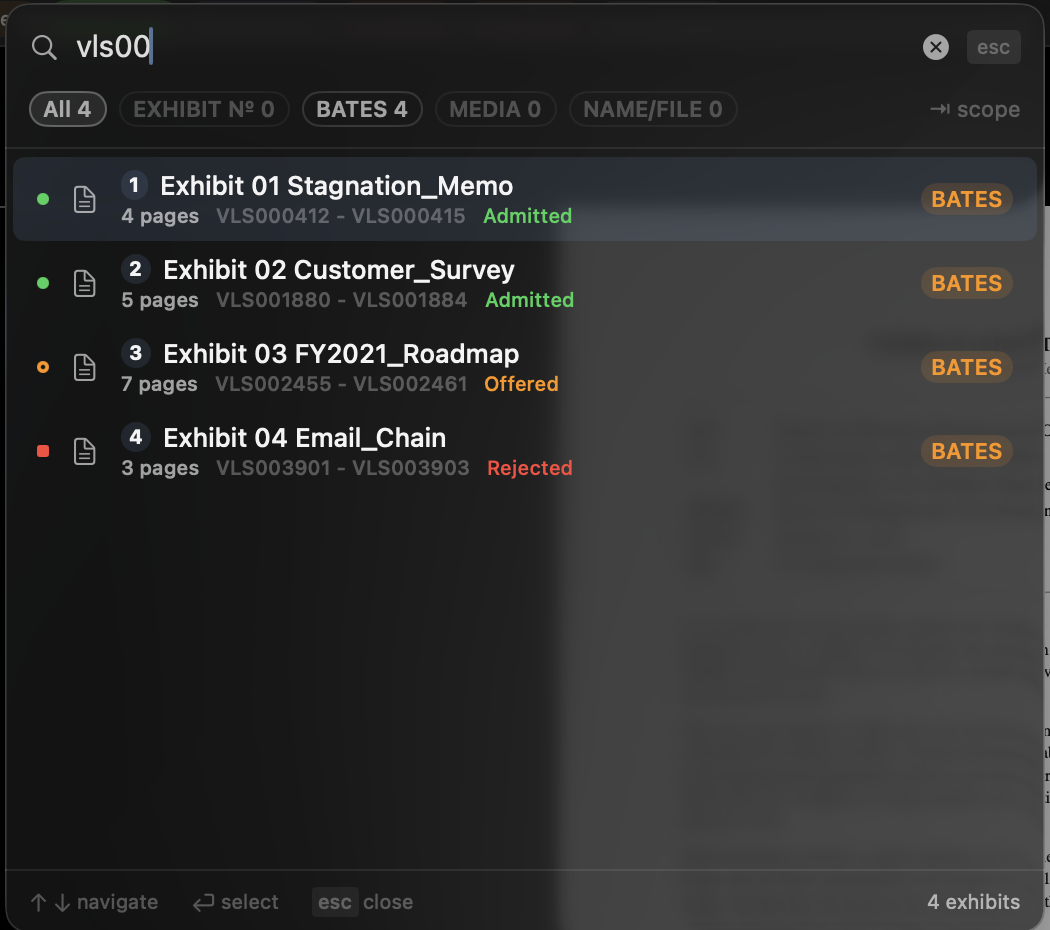
Quick Search: tap Space twice, anywhere. Every hit says what matched
The paper trail builds itself.
- Admission Board. Offered, admitted, conditional, rejected, excluded, withdrawn, each with the witness it came in through and when. The clerk report exports itself, grouped the way the clerk wants it.
- Exhibits Shown record. The first time each exhibit reaches the jury is stamped permanently. Export exactly what the jury saw, and when.
- QR recall. Every exhibit and clip carries a scannable code. Scan a printed exhibit list with a barcode scanner and the exhibit stages instantly. No typing mid-examination.
- Target Notebook. Turn it on for a hearing and everything published to the jury files itself into a binder. The record keeps itself.
The exhibit sidebar, Bates ranges and all
The features you find the night you need them.
Siri, hands free
"Create a clip of Smith 12 5 to 13 2." The clip cuts itself, range and all, while your hands stay on the transcript.
Redaction assistant
SSNs, emails, phones, birth dates, and account numbers found for you, then burned permanently into flattened exports.
Watched folders
Tonight's production lands in a folder; Evidentiary sees it, holds it in a review tray, and files it on your say-so.
Named snapshots
Save tonight's markups under a name. Restore them in court tomorrow, exactly as drawn.
Murky scans, rescued
Brightness, contrast, saturation, temperature, and tint, adjusted live while the exhibit is on the jury display.
Slide decks from a binder
The Presentation Creator turns a binder's pages and clips into a Keynote deck for opening or closing, with title slides and your choice of background.
Ask Evidentiary
The manual answers back. Ask how to do something and the answer arrives with the guide chapter it came from, all on-device with nothing sent anywhere. And the ? in the corner opens the guide at whatever you're working on.
Stickers, Bates, batch rename
Court exhibit stickers, Bates prefixes like SMITH- or PEX-, and a renamer that previews every file before it touches one. None of it destructive.
Document camera
An iPhone or iPad over Continuity Camera, or any camera the Mac sees, becomes the document camera: show a page live to the jury, or capture a stack of pages straight into the case.
Focus zones and a magnifier
Mark a region and the jury's picture flies into it on a click. Or switch the laser to a magnifying glass that rides the pointer on both screens.
Ready for court?
The Pre-Trial Check audits displays, files, and settings before you walk in. Run it from Quick Search, or just ask Siri.
Still not convinced? Good. You're a lawyer.
Skepticism is the job. So here's the complete record: every feature in the current build, all 201 of them, one subscription, no add-ons.
Exhibits & documents 25
- Drag-and-drop import for PDF, images, video, and audio
- Word, Excel, and PowerPoint import with inline preview
- Bulk exhibit creation from a CSV list
- Watched folders with a review-before-filing ingest tray
- Duplicate detection by content hash
- Swap a corrected file without losing number, annotations, or history
- One-click PDF repair and rasterization
- In-place video re-encode that fixes playback without shifting clip times
- File quarantine with mark-safe recovery
- Batch admission status, binder filing, and delete
- Batch numbering with Bates prefixes
- Non-destructive, searchable Bates page overlays
- Per-document OCR you control
- Batch file renamer with rule chains, live preview, and full revert
- Sidebar search across names, numbers, file names, Bates, and OCR text
- Private on-page find that never reaches the jury
- Named markup snapshots: save tonight, restore in court tomorrow
- Finder-style keyboard browsing of exhibits and pages
- Standard court exhibit stickers, non-destructive
- Redaction assistant for SSNs, emails, phones, birth dates, accounts
- Redactions burn permanently into flattened exports
- Batch Admit: paste the clerk's ruling and every status lands at once
- Sticker presets per party, and a binder stamped with running numbers in one click
- Ignore a cover page so page 2 becomes page 1 everywhere, reversible in one click
- Instant switching between documents, with thumbnails that survive restarts
Presenting to the jury 48
- Stage privately, publish on Return
- Staged and Live on one presenter-bar button, dim until a display is enabled, one key flips it
- Reverse publish pulls the jury view back to you
- Instant blackout
- Blackout again brings back what the jury was seeing
- Side-by-side compare with teal and purple pane identity
- Live highlight, callout magnification, and redaction marks
- Arrows, lines, shapes, freehand, and text labels
- On-screen measurement tool
- Laser pointer, classic dot or comet trail, draws a fading line while the button is held
- Laser color and fade length from the right-click menu, Shift keeps it straight, a rough loop snaps to a circle
- Click-to-erase and draggable grips on every mark
- Callout handles you can see: corners scale, edges crop the magnified region
- Control-drag inside a callout scrolls the page under it
- Highlights and redactions resize by their handles
- Draw with any tool on the jury display itself
- Undo and redo while presenting
- 90° rotation plus single-degree deskew
- Zoom, including straight to the top or bottom half of a page
- Page | Scroll reads a long exhibit as one column, frozen the moment you start to annotate
- A page ruler on the scroll column's edge, click to align any page
- Live brightness, contrast, saturation, temperature, and tint for murky scans
- Video with a full transport: stream live or send a frozen frame
- Evidence Lock keeps unadmitted exhibits off the jury screen
- Court-excluded exhibits double-checked even with the lock off
- Presenting title bar and menu-bar indicator
- Copy the exact jury frame for the record
- Multi-display mirroring with a per-screen privacy map
- Identify Displays flashes a number on every screen
- Jury view heals itself after cable or projector dropouts
- Letterboxed proportions on any screen shape
- Jury display backdrop: a color, or your logo, centered or tiled
- Staging canvas in the background color you choose
- Presentation history with permanent first-shown stamps
- Trial Mode hides the Dock and guards ⌘Q
- Pre-Trial Check for displays, files, and settings
- Compare stage locked to the jury display's aspect and split exactly 50/50
- Two-page spread in one key, with a page lock that freezes the comparison
- Side-by-side snapshots that restore both panes, pages, and marks at once
- Double-click a compare pane to open that page in single view
- ⌘P prints the staged exhibit with its redactions burned in
- The title bar names the staged exhibit
- Pre-Trial Check offered the moment the courtroom display connects
- Undo publish: ten seconds to pull a wrong page back, exactly as it was
- The JURY badge counts how long the current page has been up
- Compare Text: a word-level diff of two pages, deletions red, additions green
- Pick which speakers the jury hears, and test them with a tone
- A Focus Shortcut runs when the jury display opens, so no banner lands on the jury
Depositions & sync 20
- Import a whole deposition folder in one drop
- Several depositions at once, one folder each
- Sync XML arrives pre-synced; TXT and PDF transcripts supported
- Multi-volume video with visible volume markers
- On-device speech sync with word-level timing
- Translator mode for interpreted testimony
- Manual sync anchors for difficult audio
- Machine-generated rough transcript to start before the certified one arrives
- Transcript reader with page:line numbers, search, and adjustable size
- Copy testimony with a brief-ready citation
- Smart Summary topic overview with page:line links
- Sync moves between cases and apps: .tws and Sync XML
- Batch-sync every deposition in the case, in the background
- Sync health report: audio gaps, unmarked breaks, missing volumes
- Page:line realignment when a transcript parses out of register
- Per-deposition audio boost that carries through to exports
- Edit Sync: play from any line, tap Return as each line is spoken, and only the drift between your pins re-times
- Speech recognition re-listens to the stretches you repaired and polishes them to the word
- Page ranges under every deponent, so a missing volume is obvious
- Cancel an import midway with nothing left behind
The clip editor 38
- Clip lists with transcript, video, and list side by side
- Create clips from a selection, a typed range, or I/O marks
- Partial-line clips trim to the word
- Ranges crossing a volume boundary split automatically
- Click any word to play from it
- On-device clip name suggestions
- Mass Add: paste a whole designation list, validated live
- Mass Revise: removals and additions applied in one previewed pass
- Reads formal designation wording exactly as received
- One paste can designate several witnesses
- Highlighted-PDF import maps colors to parties
- Waveform view of every in and out point
- Only synced lines show under the waveform
- A per-word wash follows the playhead through the transcript
- One-click TRIM removes leading and trailing silence
- Auto-fill times from sync data
- Free-run audition past the OUT point
- Possible objections flagged inline: Form, Hearsay
- Clips cut, copy, and paste like text, even between depositions
- Caption styling that carries into playback and exports
- Find & Replace across captions without touching the transcript
- Meaning-based transcript search, designate straight from the results
- QC Review auditions every endpoint in seconds
- Green QC checkmarks clear themselves if a clip is edited
- List Check audits media, times, overlaps, and mid-word cuts
- Revised designations fold in as marked changes with a PDF report
- Counter-designation import with per-row accept
- Attorney-side playback window that saves your spot
- Play All runs the list on the jury display
- Split a clip at the playhead, or at any transcript line
- Merge consecutive clips, or excise lines from the middle of one
- Per-clip objection status, so sustained clips never play
- Named parties, each with its own color down the clip list
- Per-line caption overrides with word-level highlighting
- Drop a designation file anywhere in the Mass Add window
- Save List and Paste Revised List: unchanged ranges keep their timing and links
- Ranges for another volume of the same deponent route to that volume automatically
- Auto QC ends with a tally: resolved, and still needs a look
Playback & broadcast 12
- Whole-list playback in an attorney-side window
- Numbered clip queue with ranges, durations, and counter tags
- Clip progress and session progress side by side
- One-button broadcast to the jury display
- Five jury-side switches: captions, page:line, video, audio, document
- Video and audio chained for a one-click objection cover
- Captions clipped to the designation, so nothing undesignated can surface
- Linked documents full-screen with the video tucked into a corner
- Resume where you stopped, remembered per list
- Exhibit pop-out for a second monitor
- Time remaining in the current clip and in the whole list
- Mute hides the jury captions too, and words spoken while muted never resurface
Impeachment 4
- Impeach opens a dedicated player, cued, with live page:line captions
- Independent of the jury display until you choose to show it
- Impeach with Text Only: the quote itself, cited, on a clean card
- Works on any transcript, no video or sync required
Search 15
- Double-Space Quick Search over the whole case
- Exhibit numbers, names, Bates ranges, and file names
- Full-text hits inside OCR'd documents, with excerpts
- Semantic search finds pages by meaning
- Type 45:12 to jump any deposition to that page and line
- Run app actions from the same box
- Every PDF's text indexed at import, so typed documents need no OCR step
- A badge on every result saying what matched; Tab narrows to one kind
- Find inside the staged document from the page bar, whole document or This page
- OCR a scan one page at a time, straight from the find field
- Highlight turns a page's hits into real marks, all of them or just the outlined one
- The exhibit filter marks matching pages and opens them with the hits lit
- Jump straight to a page from Quick Search: type 12 p5
- Recently Shown: an empty Quick Search lists the last ten things the jury saw
- Verbs work: stage P-14 p3, show 12, play clip 7
Organize & recall 7
- Playlists queue documents, video, and audio in order
- Binders organize by witness, motion, or trial day
- Spring-open drag filing and a create-on-drop zone
- Witness Binder assembles itself from a deponent
- Target Notebook records everything published, automatically
- Barcode-scan a printed list to stage an exhibit instantly
- QR codes on every page of a printed exhibit
Siri & voice 5
- Ask Siri how to do anything; the guide opens at the answer
- Create clips by voice, range and all, hands free
- Create playlists by voice
- "Is Evidentiary ready for court" runs the Pre-Trial Check
- Wrap any of it in the Shortcuts app
Reports & exports 14
- Exhibit list as PDF, text, or CSV with toggleable columns
- Exhibits Shown record: what the jury saw, and when
- Clerk admission report, grouped PDF or flat CSV
- Clip Report and condensed-transcript PDF
- Clip video as separate MP4s or one combined file
- Burned-in captions, optional
- Export profiles for courtroom, review, and email delivery
- Quality picker with an HEVC smaller-files option
- Linked exhibits burned into clip video, jury-style
- Sync XML and full-fidelity .tws sync export
- Keynote deck from a clip list
- Whole lists exchange as .dce files
- Full Report PDF prints one highlighted transcript section per deponent or volume
- Frame-by-frame encoding keeps clip exports a fraction of the usual size
Reliability & privacy 13
- Continuous auto-save, no Save button to forget
- Auto-resume to your exact spot, with a safe-mode escape
- Cloud-folder placeholders detected and warned about
- Half-downloaded cases refused before they can corrupt
- Everything runs on-device: sync, search, summaries, redaction
- No telemetry, no analytics, no accounts
- No internet required in the courtroom
- One .trialcase package holds the whole case
- Every key rebindable, full reference on ⌘/
- Interactive tour, sample case, and an assistant that answers "how do I"
- A ? button that opens the guide at whatever you're working on
- Larger view: one switch enlarges every pop-up window, and it sticks
- Battery, Focus, and jury speakers checked before the jury sits, with a pill when the charge runs low
Every tool you need Included inside the app.
Deposition sync, the clip editor, playback, impeachment, presenting, and search are one application over one case file: no exporting between tools, no second machine at counsel table, no connection to lose.
Your case stays at counsel table.
Everything runs on your Mac. Transcription, semantic search, redaction suggestions, summaries: all on-device. No cloud. No accounts. No internet required in the courtroom.

One plan. No add-ons.
Evidentiary is a subscription: monthly, or yearly at a discount. Every feature in the app is included. No tiers, no add-ons, nothing held back.
Asked and answered. No objection.
Does Evidentiary need an internet connection in the courtroom?
No. Evidentiary runs entirely on your Mac. Transcription, search, and playback are all on-device, with no cloud, no accounts, and no telemetry. Courtroom Wi-Fi is never required.
How does Evidentiary sync deposition video to the transcript?
On-device speech recognition aligns the video to the transcript at word-level accuracy. Nothing is uploaded, and the audio and video never leave your machine.
Is Evidentiary a Mac alternative to Windows trial presentation software?
Yes. Evidentiary is a native Mac app built for the same job: deposition designations, video clips, impeachment, and exhibit presentation. No Windows machine or virtual machine is required.
What can Evidentiary import and export?
Import PDFs, images, video, and audio alongside your transcripts. Export video clips with burned-in captions, condensed transcript PDFs, sync files, and admission reports for the clerk.
What does Evidentiary run on?
Evidentiary is a native Mac app, available on the Mac App Store, and requires macOS 26.4 or later.
Talk to a human.
Trying Evidentiary for an upcoming trial? Have a workflow we should support? Write to us. We read everything, and trial-week questions go to the top of the pile.
Support@evidentiarysolutions.com
Evidentiary Solutions, LLC · Florida, United States